Eclipse CDT 12 New Features – Eclipse IDE 2025-03

I am delighted to announce the release of Eclipse CDT 12 and CDT LSP 3, which will be generally available this Wednesday as part of the Eclipse IDE 2025-03 release.

The preferred way to get CDT is to install Eclipse CDT as part of the Eclipse IDE for C/C++ Developers using the installer. Further release information on how to get CDT will be published on Wednesday on the GitHub CDT 12 release page.

The two themes for the CDT 12 release are highlighting the new C/C++ editing experience based on the CDT LSP project by leveraging clangd and improved CMake integration, especially for CDT extenders. But there are many other new and noteworthy items, along with over 200 issues and PRs closed across CDT and CDT LSP repos.

Here is a video highlight of the new C/C++ Editing Experience based on the Language Server Protocol (LSP) using clangd and showing the improved CMake integration.

EclispeCon talk: The reality of CDT’s LSP and Tooling situation

I will be delivering a couple of talks at EclipseCon 2024, recently rebranded as OCX – https://www.ocxconf.org/. Here is the abstract for the first of these (link to the slot in the program):

In this talk, we explain the current state of the C/C++ Development Tooling (CDT) and its future alongside Language Server Protocol (LSP) and its associated tooling such as clangd. As software development evolves, the integration of LSP has become pivotal in enhancing code editing experiences across various integrated development environments (IDEs). We will explore the successes and challenges faced in implementing LSP in CDT building on top of the Eclipse LSP4E framework, examining how it impacts productivity, code quality, and developer experience. The talk will also address the compatibility and performance issues encountered and future directions for improving CDT’s tooling. Attendees will gain insights into the practical realities of maintaining and evolving tooling for C/C++ development in a rapidly changing technological landscape.

Wasm Diaries: Making My First Contribution to Emscripten

The Open-Source project: Emscripten

I have been working on a WebAssembly project porting some desktop code to run in a web browser and we have been using Emscripten as our tool chain. Emscripten is an open-source compiler toolchain that allows you to compile C/C++ code to WebAssembly, enabling it to run in web browsers. But it is more than a just compiler, Emscripten is a full SDK as it also includes the runtime library allowing interaction with the web browser with JavaScript.

The bug, a race condition?

My system has an Emscripten compiled C program running in a Web Worker that writes data that is read by another Web Worker. A SharedArrayBuffer is used to connect the two Web Workers together, basically as a queue. When the queue was big enough the program behaved exactly as expected, however when the queue filled up I would observe out of order and corrupt data on the read side.

For a simple example, if the C program did fprintf(f, "abcdefghijklmnopqrstuvwxyz\n) the receiving Web Worker would receive a random character replaced with a newline, such as “abcdefg\nijklmnopqrstuvwxyz\n". I eventually determined that the corruption only occurred if the queue went from full to not full in the middle of processing a single write.

Determining this was difficult because any debugging I did or logging I added to my program changed the behaviour sufficiently to remove or at least significantly relocate when I saw the bug. This is why I concluded that it was a race condition.

Understanding the problem was related to the queue being full allowed me to configure my test case with a full buffer that I could control when it transitioned from full to not full (by careful placement of breakpoint on the receiving side) allowing me to step through a reproducible test case.

Once I was able to step through the code finding the bug was very easy, a simple loop termination condition was missing in the implementation of the doWritev function that underpins much of the stdio output handling.

Submitting my first issue

The first step in contributing anything non-trivial to an open-source project is to create a bug report. This allows you to discuss with the maintainers and the rest of the project’s ecosystem about the validity of your findings.

I summarized all my findings, along with my probable fix as a bug report in Emscripten’s GitHub issue tracker, Issue #22258.

The Emscripten maintainers were very responsive to my bug report which allowed me to have confidence that my assessment was probably correct, and that the community would be receptive to me doing the work to submit a Pull Request to resolve the issue.

Creating a Pull Request – have a good test case!

I could have created a PR with the one-line fix and called it a day as I already had a fix applied in my code base. The problem was possibly well enough understood to be merged with only that. However, to demonstrate exactly what the fix meant and to ensure it did not regress in the future writing a new test case was something I felt was important.

I had a working test as part of the test suite of my internal work, but it relied on my components that were not suitable to contribute to Emscripten at this time. My tests also relied on running the test in a tight loop to increase the chances of hitting the race condition. Therefore, I needed a more suitable test case.

Emscripten has an extensive test suite. The first step was to make sure I could run some tests and find a similar test I could copy as a starting point. Running some tests was straightforward with the test/runner program. To identify a test that may cover the same code I ran git blame on doWritev and identified a recent fix with associated test case that I used as my basis for my test, test_fs_writev.

I was able to write a simple test case that demonstrated the problem. The process of writing the test case also allowed me to understand the problem better, as well as learn a lot about the Emscripten code base. I captured my better understanding of the original problem in a new comment on my issue, and I submitted a Pull Request with my fix and test case, PR #22261.

The Review Process

Submitting the pull request was just the beginning. The next step was the review process. Emscripten maintainers reviewed my changes, provided feedback, and suggested improvements. This process was incredibly valuable as it helped me learn more and gave me the opportunity to dive into other related parts of the code base, such as the new WasmFS component to verify it didn’t suffer from the same issue. I was also able to submit a few additional smaller issues and PRs that were triggered by working on this bug fix.

After addressing the feedback, my pull request was merged into main. From observing the bug in my project to getting the PR merged was approximately one week and I am pleased that my bug fix will be part of an upcoming release of Emscripten.

Encouragement for New Contributors

I have been an open-source maintainer for many years, including being a project lead on various Eclipse open-source projects. This was my first contribution in a while on a project I had no prior relationship with. It was really useful to be in the position of a new contributor again as I plan to adapt some of my experiences to improving the other open-source projects that I am part of.

If you’re considering contributing to open-source projects, I highly encourage you to take the plunge. The Emscripten is a healthy project with attentive maintainers who engage well with potential contributors. I hope I can help provide contributors to Eclipse projects have the same sense of pride at contributing as I got from being a first-time contributor to Emscripten.

EclispeCon talk: Zero-Install Embedded C/C++ Development: Running GDB in the Browser with WebAssembly

I will be delivering a couple of talks at EclipseCon 2024, recently rebranded as OCX – https://www.ocxconf.org/. Here is the abstract for the first of these (link to the slot in the program):

This talk introduces an approach to embedded development: running the GNU Debugger (GDB) directly in the browser using WebAssembly, eliminating the need for traditional installations.

Attendees will discover how this solution can be integrated by leveraging the Eclipse CDT Cloud Project targeting popular web based IDEs such as Visual Studio Code (VSCode) and Eclipse Theia. By using WebAssembly, we can run GDB directly in the browser, providing a seamless debugging environment across different systems.

In addition, the talk will cover the exciting capabilities of modern browsers to connect to hardware using WebUSB. This allows developers to interface with embedded devices directly from the browser, further simplifying the development and debugging process.

Join us to explore the future of zero-install embedded C/C++ development and see firsthand how these technologies can revolutionize your development experience.

ConPTY Performance in Eclipse Terminal

Background

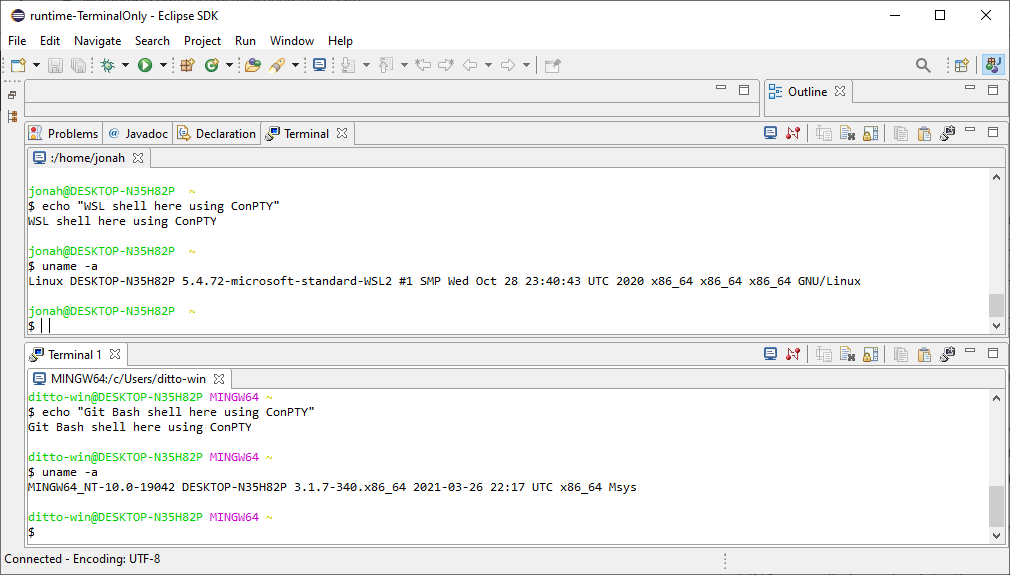
For many years the Eclipse IDE has provided an integrated terminal (called Eclipse TM Terminal) and now maintained by the Eclipse CDT team. On Windows the terminal uses the amazing WinPTY library to provide a PTY as Windows did not come with one. For the last number of years, Windows 10 has a native version called Windows Pseudo Console (ConPTY) which programs such as VSCode and Eclipse Theia have converted to using, in part because of the fundamental bugs that can’t be fixed in WinPTY. The WinPTY version in Eclipse is also quite out of date, and hard to develop as it is interfaced to by JNI.

For Eclipse 2021-06 the Eclipse CDT will be releasing a preview version of the terminal that will use ConPTY. For interfacing to ConPTY we are using JNA which is much easier to develop because all the interfacing is in the Java code.

One of the open questions I had was whether there would be a performance issue because of the change to ConPTY. In particular, while JNA is slower for some things the ease of use of JNA normally far outweighs the performance hit. But I wanted to make sure our use case wasn’t a problem and that there wasn’t anything else getting in the way of the terminal’s performance.

Shell to Eclipse Terminal Performance

I have analyzed the performance of a process running in the shell writing to stdout as fast as possible to compare various different terminal options on my Windows machine. The Java program creates a byte[] of configurable size and writes that all to System.out.write() in one go, with some simple wall clock timing around it. See the SpeedTest attachment for the source.

I used 5 terminal programs to test the performance:

  • Windows Command – the classic terminal when you run cmd.exe for example
  • Eclipse with WinPTY
  • Eclipse with ConPTY
  • Windows Terminal (from the people who wrote conpty)
  • VSCode’s integrated terminal using ConPTY

And in each of them I ran the same Java program in 3 different shells:

  • cmd.exe
  • WSL2 running Ubuntu bash
  • git bash

Short summary is that WinPTY and Windows Command are much faster than the rest. ConPTY is quite a bit slower, whether used in Eclipse or Windows Terminal. VSCode is dramatically slower than the rest.

cmd.exeWSL2git bash
Windows Command8.33.54.2
Eclipse with WinPTY12.51.67.7
Eclipse with ConPTY1.81.72.0
Windows Terminal2.22.12.4
VSCode0.80.80.8
Full table of results based on a 10MiB write, reported in MiB/second, rounded to nearest 0.1 MiB/s:

As a comparison, on the same machine dual-booted into Xubuntu 18.04 I ran the following 5 terminals:

  • Eclipse – 23.1 MiB/s
  • VSCode – 3.0 MiB/s
  • xterm – 6.3 MiB/s
  • xfce4-terminal – 10.7 MiB/s
  • gnome-terminal – 10.2 MiB/s

The above shows that the raw speed of Eclipse Terminal is very good, it simply requires the best possible PTY layer to achieve the best speeds.

Eclipse Terminal to Shell Performance

I was going to run an Eclipse -> Shell test to make sure writes to the terminal hadn’t regressed. However the terminal has an artificial throttle in this path that limits performance to around 0.01 MiB/s, plenty fast to type, but much slower than a performant system could be. The code could probably be revisited because presumably the new ConPTY does not suffer from these buffering issues, and the throttling probably should not be there for non-Windows at all.

Conclusion

I am pleased that the performance of ConPTY with JNA is close to the new dedicated Microsoft Terminal and much faster than VSCode. Therefore I plan to focus my time on other areas of the terminal, like WSL integration and bug fixes with larger impacts. I am grateful to the community’s contributions and I will happily support/test/integrate any improvements, such as the upcoming Ctrl-Click functionality that was contributed by Fabrizio Iannetti and will be available in Eclipse IDE 2021-06.

Because much of the performance slowdown is because of ConPTY itself, which is actively being developed at Microsoft I hope that Eclipse will benefit from those performance improvements over time. There is no plan to remove the WinPTY implementation anytime soon, so if there is a user who feels impacted by the slowdown I encourage them to reach out to the community (cdt-dev mailing list, tweet me, comment on this bug or create a bug report).