Beware diversity-led marketing (& three cheers for these companies doing diversity right)

IMG_20171025_133846

There’s an increased level of discussion on improving diversity in tech communities. Or maybe it was always there and I just started paying attention. Either way, it’s a really good thing. But in the mix there is definitely a certain amount of diversity-led marketing e.g “We need more women-in-tech! Women, sign up for this tech course here…”.  Some are more obvious than others.

What about tech conferences? Take the case of a tech conference getting some promotion off the back of free diversity tickets. Is that just diversity-led marketing and a bad thing? After all it’s great to get underrepresented folks into conferences, right? The answer is if it is done in isolation then it is probably just self-serving marketing and pr. Underrepresented folks aren’t merely props for your agenda

Diversity is complicated. It’s easy to get it wrong and end up like the conference organizers who violated their own code-of-conduct and had a speaker cancel their talk.  Or fall into the Google case of  trying to inspire teen girls to code while simultaneously systematically limiting the careers of women in your company.  Again diversity is complicated, so we all want to focus our energies on those doing it the right way.

Open source has a worse record than most when it comes to diversity.  At this year’s Eclipsecon Europe, as with every tech conference I attend, I did my own evaluation of what’s being done well and not so well. This year, I noticed a few companies who are doing something right as evidenced by the women and underrepresented minorities that are in leadership positions.

  1. IBM – IBM had a noticeably improved presence at this year’s conference. I learnt that they actively encouraged speaker proposals. If a talk is accepted, there are good company policies in place to ensure speakers can travel and attend the conferences. As a result we had four awesome women speakers from IBM, not just any speakers, but experts in their respective fields: Eclipse JDT leads Noopur Gupta and Sarika Sinha, Eclipse SWT committer Lakshmi Shanmugam and Eclipse Microprofile committer Emily Jiang.
  2. OBEO – OBEO specialize in graphical modelling and are well respected in the community. Melanie Bats is one of the rockstars in the community, doing terrific and imaginitive tech talks and also recently took over as the Eclipse Planning council lead. OBEO recently promoted Melanie to CTO, which is written about beautifully here: Zero-to-CTO.
  3. BREDEX – BREDEX specialize in testing and are well represented at EclipseCon by the indefatigable Alex Schladebeck. Alex can be found leading the highly enjoyable Kahoot quiz at EclipseCon as well as heading up the Project Quality day. Doing great things in the testing world, it was great to learn that Alex has been promoted to  ‘Head of Software Quality and Test Consulting’ at BREDEX.

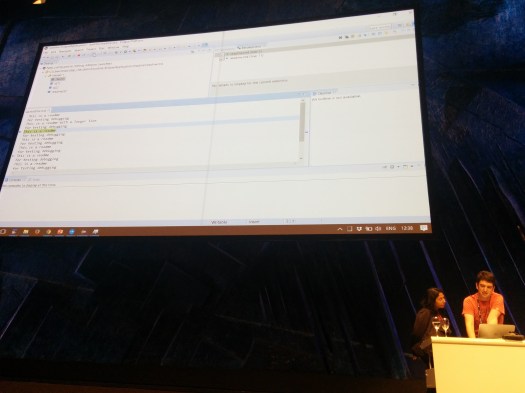
These three companies set a great example for the rest of us, not to mention make us better at our work as a community. Which brings me to the picture at the top of this blog post. I like to get setup really early before I do a tech talk, especially one in a huge room with a massive screen. So while getting setup, Jonah Graham of Kichwa Coders and Sarika Sinha of IBM got into a discussion about debugger protocols and threading issues. To discuss the finer points my laptop was commandeered and out came the code. It was one of those serendipitous moments and I didn’t want my pre-talk nerves to stop them. So I took a seat and took pictures while taking deep breaths. I think my talk went well anyway. That one conversation really informed our thinking on our work on the future of debuggers. And really it reminded me in a powerful way how things are always better the more different types of people you get involved. And little moments like these make it all worthwhile, and worth doing right, in the best way possible.

Debug Protocol: Coming soon to an IDE near you

Our absolute favourite type of talk to do is one where we’ve been working on something so cutting-edge that we don’t have all the answers yet. This was the case with our work on the debug protocol and our talk at EclipseCon Europe. We got to take where we’d gotten to and present it to a room full of smart people who were generous enough to show up, ask questions and give us their insightful feedback.

The talk gives an overview of the debug protocol then demonstrates it working in:

  • VS Code
  • Eclipse IDE
  • Eclipse Che

We demo 7 different types of debug functionality as supported by the protocol: Continue reading “Debug Protocol: Coming soon to an IDE near you”

The language server protocol will revolutionize how you code

lsps

The next generation Spring Boot tooling has been completely refactored to be based on the language server protocol (LSP). The tooling covers things like code assist for the Spring Boot property file, support for Cloud Foundry manifest files as well as Spring Boot support for Java files with typical features such as validation, content-assist and quick-fixes.

Beyond IDEs

Continue reading “The language server protocol will revolutionize how you code”

The Future of Developer Tools for IoT, ThingMonk 2017

ThingMonk is an annual London conference that brings together the people building and shaping the Internet of Things. This year I spoke at the conference on ‘The Future of Developer Tools for IoT’. This talk looks at emerging and future trends in the developer tools space. Check out the slides and feedback from the audience, as well as reference links at the end. Plus thanks to Marcel Bruch & Codetrails for input on AI tools. Be sure to share your thoughts on how you see developer tools shaping up to scale for building the Internet of Things.

Continue reading “The Future of Developer Tools for IoT, ThingMonk 2017”

Woohoo! Java 9 has a REPL! Getting Started with JShell and Eclipse January

With Java 9 just around the corner, we explore one of its most exciting new features – the Java 9 REPL (Read-Eval-Print Loop). This REPL is called JShell and it’s a great addition to the Java platform. Here’s why.

With JShell you can easily try out new features and quickly check the behaviour of a section of code. You don’t have to create a long-winded dummy main or JUnit test – simply type away.  To demonstrate the versatility of JShell, I am going to use it in conjunction with the Eclipse January package for data structures. Eclipse January is a set of libraries for handling numerical data in Java, think of it as a ‘numpy for Java’.

Install JShell

JShell is part of Java 9, currently available in an Early Access version from Oracle and other sources. Download and install Java 9 JDK from http://jdk.java.net/9/ or, if you have it available on your platform, you can install with your package manager (e.g. sudo apt-get install openjdk-9-jdk).

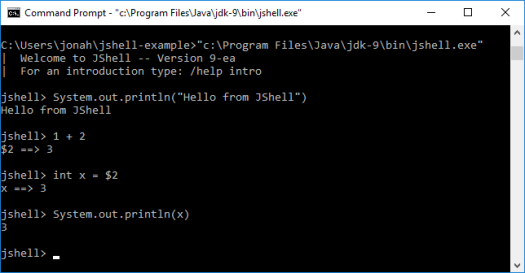
Start a terminal and run JShell:capture1

As you can see, JShell allows you to type normal Java statements, leave off semi-colons, run expressions, access expressions from previous outputs, and achieve many other short-cuts. (You can exit JShell with Ctrl-D.)

Using JShell with Eclipse January

To use Eclipse January, you need to:

1. Download January:

Get the January 2.0.2 jar ( or older version January 2.0.1 jar).

2. Download the dependency jars:

The January dependencies are available from Eclipse Orbit, they are:

3. Run JShell again, but add to the classpath all the jars you downloaded (remember to be the in the directory you downloaded the jars to):

Windows:

"c:\Program Files\Java\jdk-9\bin\jshell.exe"  --class-path org.eclipse.january_2.0.2.v201706051401.jar;org.apache.commons.lang_2.6.0.v201404270220.jar;org.apache.commons.math3_3.5.0.v20160301-1110.jar;org.slf4j.api_1.7.10.v20170428-1633.jar;org.slf4j.binding.nop_1.7.10.v20160301-1109.jar

Linux:

jshell --class-path org.eclipse.january_2.0.2.v201706051401.jar:org.apache.commons.lang_2.6.0.v201404270220.jar:org.apache.commons.math3_3.5.0.v20160301-1110.jar:org.slf4j.api_1.7.10.v20170428-1633.jar:org.slf4j.binding.nop_1.7.10.v20160301-1109.jar

Some notes:
Some version of jshell the command line argument is called -classpath instead of --class-path
If you are using git bash as your shell on Windows, add winpty before calling jshell and use colons to separate the path elements.

capture2

Then you can run through the different types of January commands. Note JShell supports completions using the ‘Tab’ key. Also use /! to rerun the last command.

Import classes

Start by importing the needed classes:

import org.eclipse.january.dataset.*

(No need for semi-colons and you can use the normally ill-advised * import)

Array Creation

Eclipse January supports straightforward creation of arrays. Let’s say we want to create a 2-dimensional array with the following data:

[1.0, 2.0, 3.0,
 4.0, 5.0, 6.0,
 7.0, 8.0, 9.0]

First we can create a new dataset:

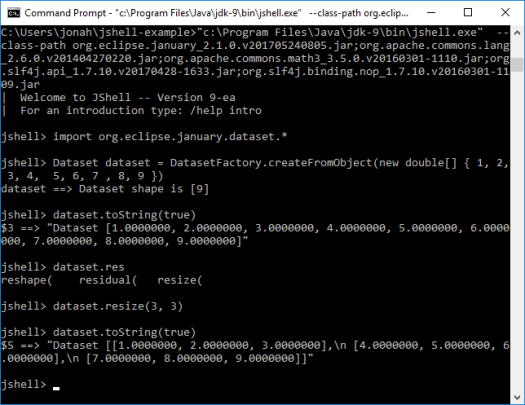
Dataset dataset = DatasetFactory.createFromObject(new double[] { 1, 2, 3, 4, 5, 6, 7, 8, 9 })
System.out.println(dataset.toString(true))

This gives us a 1-dimensional array with 9 elements, as shown below:

[1.0000000, 2.0000000, 3.0000000, 4.0000000, 5.0000000, 6.0000000, 7.0000000, 8.0000000, 9.0000000]

We then need to reshape it to be a 3×3 array:

dataset = dataset.reshape(3, 3)
System.out.println(dataset.toString(true))

The reshaped dataset:

 [[1.0000000, 2.0000000, 3.0000000],
 [4.0000000, 5.0000000, 6.0000000],
 [7.0000000, 8.0000000, 9.0000000]]

Or we can do it all in just one step:

Dataset another = DatasetFactory.createFromObject(new double[] { 1, 1, 2, 3, 5, 8, 13, 21, 34 }).reshape(3, 3)
System.out.println(another.toString(true))

Another dataset:

 [[1.0000000, 1.0000000, 2.0000000],
 [3.0000000, 5.0000000, 8.0000000],
 [13.000000, 21.000000, 34.000000]]

There are methods for obtaining the shape and number of dimensions of datasets

dataset.getShape()
dataset.getRank()

Which gives us:

jshell> dataset.getShape()
$8 ==> int[2] { 3, 3 }

jshell> dataset.getRank()
$9 ==> 2

Datasets also provide functionality for ranges and a random function that all allow easy creation of arrays:

Dataset dataset = DatasetFactory.createRange(15, Dataset.INT32).reshape(3, 5)
System.out.println(dataset.toString(true))

[[0, 1, 2, 3, 4],
 [5, 6, 7, 8, 9],
 [10, 11, 12, 13, 14]]


import org.eclipse.january.dataset.Random //specify Random class (see this is why star imports are normally bad)
Dataset another = Random.rand(new int[]{3,5})
System.out.println(another.toString(true))

[[0.27243843, 0.69695728, 0.20951172, 0.13238926, 0.82180144],
 [0.56326222, 0.94307839, 0.43225034, 0.69251040, 0.22602319],
 [0.79244049, 0.15865358, 0.64611131, 0.71647195, 0.043613393]]

Array Operations

The org.eclipse.january.dataset.Maths provides rich functionality for operating on the Dataset classes. For instance, here’s how you could add 2 Dataset arrays:

Dataset add = Maths.add(dataset, another)
System.out.println(add.toString(true))

Or you could do it as an inplace addition. The example below creates a new 3×3 array and then adds 100 to each element of the array.

Dataset inplace = DatasetFactory.createFromObject(new double[] { 1, 2, 3, 4, 5, 6, 7, 8, 9 }).reshape(3, 3)
inplace.iadd(100)
System.out.println(inplace.toString(true))

[[101.0000000, 102.0000000, 103.0000000],
 [104.0000000, 105.0000000, 106.0000000],
 [107.0000000, 108.0000000, 109.0000000]]

Slicing

Datasets simplify extracting portions of the data, known as ‘slices’. For instance, given the array below, let’s say we want to extract the data 2, 3, 5 and 6.

[1, 2, 3,
 4, 5, 6,
 7, 8, 9]

This data resides in the first and second rows and the second and third columns. For slicing, indices for rows and columns are zero-based. A basic slice consists of a start and stop index, where the start index is inclusive and the stop index is exclusive. An optional increment may also be specified. So this example would be expressed as:

Dataset dataset = DatasetFactory.createFromObject(new double[] { 1, 2, 3, 4, 5, 6, 7, 8, 9 }).reshape(3, 3)
System.out.println(dataset.toString(true))
Dataset slice = dataset.getSlice(new Slice(0, 2), new Slice(1, 3))
System.out.println(slice.toString(true))

slice of dataset:

[[2.0000000, 3.0000000],
 [5.0000000, 6.0000000]]

Slicing and array manipulation functionality is particularly valuable when dealing with 3-dimensional or n-dimensional data.

Wrap-Up

For more on Eclipse January see the following examples and give them a go in JShell:

  • NumPy Examples shows how common NumPy constructs map to Eclipse Datasets.
  • Slicing Examples demonstrates slicing, including how to slice a small amount of data out of a dataset too large to fit in memory all at once.
  • Error Examples demonstrates applying an error to datasets.
  • Iteration Examples demonstrates a few ways to iterate through your datasets.
  • Lazy Examples demonstrates how to use datasets which are not entirely loaded in memory.

Eclipse January is a ‘numpy for Java’ but until now users have not really been able to play around with it in the same way you would numpy in Python.

JShell provides a great way to test drive libraries like Eclipse January. There are a couple of features that would be nice-to-have such as a magic variable for the last result (maybe $_ or $!) and maybe a shorter way to print a result (maybe /p :-). But overall, it is great to have and finally gives Java the REPL and ability to be used interactively that many have gotten so used to with other programming languages.

In fact we will be making good use of JShell for the Eclipse January workshop being held at EclipseCon France, see details and register here:  https://www.eclipsecon.org/france2017/session/eclipse-january

eclipseConV2