Xtext is the popular Eclipse language development framework for domain specific languages. Its sweet spot is JVM-languages and it is excellent for languages where you can define the grammar yourself. But how well can Xtext cope with a non-JVM language that has undergone decades of evolution?
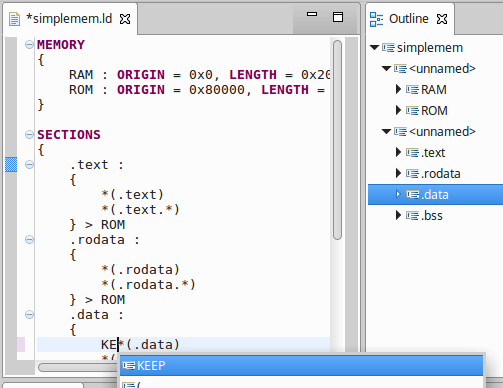
In our case, we want to see if we can take advantage of Xtext to create an editor for C/C++ linker scripts in CDT. Linker scripts are used to specify the memory sections, layouts and how code relates to these sections. Linker scripts consist of the ld command language, and this is what a simple typical script might look like:
MEMORY {
 RAM : ORIGIN = 0x0, LENGTH = 0x2000
 ROM : ORIGIN = 0x80000, LENGTH = 0x10000
}

SECTIONS {
 .text : { *(.text) *(.text.*) } > ROM
 .rodata : { *(.rodata) *(.rodata.*) } > ROM
 .data : { *(.data) *(.data.*) } > RAM
 .bss : { _bss = .; *(.bss) *(.bss.*) *(COMMON) _ebss = .; _end = .; } > RAM
}
Alternatives to Xtext
Besides using Xtext, its worth considering some of the other options there are for this task:
- Roll-your-own – the existing C/C++ Editor in CDT does this, gives full control, best error-recovery and supports bidirectionality, recreating source from abstract syntax tree (AST), but it is a last resort as it would be an incredible amount of work that would take a long time to get right.
- Antlr – write your own antlr grammar, but since antlr is already used in Xtext, may as well use Xtext and get benefits of Eclipse editor integration
- Reuse linker’s bison grammar – would give perfect parsing, but it is a no-go because i) it’s GPL ii) it generates C code not Java & iii) requirements for editing are much more strenuous than for linking and this for example, would not support bidirectionality (i.e you can’t recreate the linker file from the AST).
Benefits of Xtext
The Xtext framework additionally provides these nice features we are interested in:
- Parsing, lexing & AST generation
- serialisation support is particularly important to support bidirectionality and preserve users comments, whitespace etc.
- Rich Editor Features
- syntax highlighting
- content assist
- validation & error markers
- code folding & bracket matching
- Integrated Outline editor
- Ecore model generation which can be used for integration with UI frameworks such as EMF Forms, Sirius, etc.
Linker Script Parsing Challenges
When we talk about the ld command language being a non-JVM language, here are some specific challenges related to what that means.
- Crazy Identifiers! The following are valid identifiers in linker scripts:
- .text
- *
- hello*.o
- “spaces are ok, just quote the identifier”
- this+is-another*crazy[example]
- Identifier or Number? Things that appear to be identifiers may actually be numbers:
- a123 – identifier
- a123x – number
- 123y – identifier
- 123h -number
- Identifier or Expression?
In the grammar 2+3, for example, depending on context, can either be an identifier or an expression:
SECTIONS {
 .out_name : {
  file*.o(.text.*)
  2+3(*)
  symbol = 2+3;
 }
}
The first 2+3 is a filename, so almost anything that can be a filename is allowed there. The second 2+3 is an expression to be assigned to symbol.
Resolutions
Here’s what we did to support the linker language as far as we could:
- Custom Xtext grammar – as extending the XType grammar does not make sense, the main job is to craft the grammar to understand all the linker script identifier and expressions specifics. This involves iterating as we add in more and more language feature support, here’s the work in progress.
- Limited Identifier Support – in some cases we opted to not support certain identifiers unless they are escaped (double-quoted). While linker scripts theoretically support such identifiers (e.g. 1234abcd) we have not found a single case yet of an identifier that would actually need escaping. If one did crop up, the user could adjust it to work with the editor (e.g. “1234abcd”).
- Context Based Lexing – knowing the difference between an identifier or expression would require context based lexing rules. However this will not work with the antlr lexer. We have the option to replace it with a custom or external lexer. This is an option that can be considered in the future if desirable.
Conclusion
Xtext is a great language development framework. While Xtext may not be able to support every theoretical case of the long-lived linker script command language, it can be used to provide a very high level of support for the common features. Support for context based lexing in the future would enable a higher level of language support. Xtext can be used to provide a rich language editor with syntax colouring, command completion, integrated outline view & more in a relatively short space of time. A powerful linker script editor is another great feature for C/C++ developers that use CDT, the reference C/C++ IDE in the industry.